Configuration de l’agent MCP
Connect an AI client to Domestic Monero’s hosted MCP endpoint with a Profile DM_TOKEN. This page is install only.
- What MCP is, auth model, non-goals: MCP agents
- Tool catalog and recipes: MCP tools
MCP endpoint (paste this URL): https://mcp.domesticmonero.com/mcp
The host root https://mcp.domesticmonero.com is not the MCP path. Clients must use /mcp.
Prerequisites
- Open the Mini App from the official bot.
- You can reach Profile in the Mini App.
Bot officiel : @domestic_monero_bot — Ouvrir Mini App
Ouvrir dans TelegramIl n'existe pas de compte support séparé, de chat d'assistance ni de service de récupération tiers pour Domestic Monero. Écrivez uniquement au bot officiel.
Bot officiel : @domestic_monero_bot — Ouvrir Mini App
Publish a token in Profile
- Open the Mini App → Profile.
- Open MCP access.
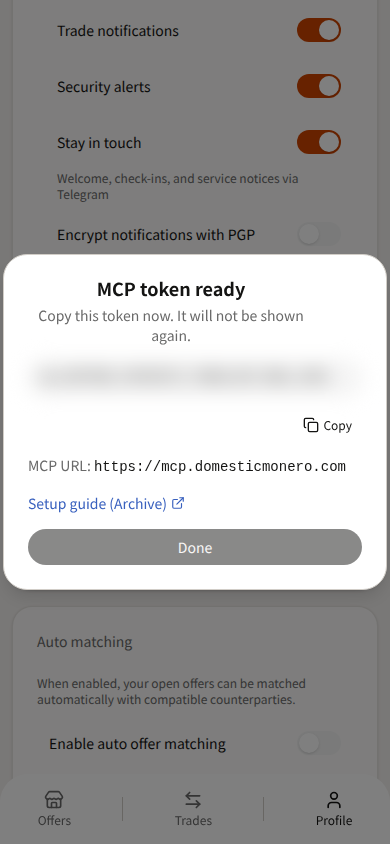
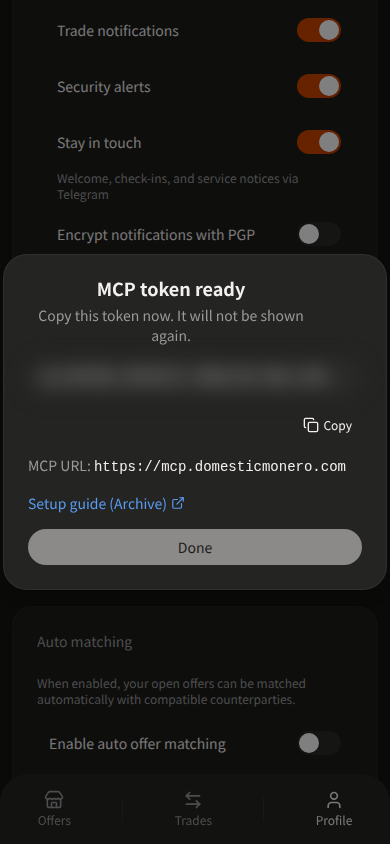
- Publish a token. Copy it when it is shown — the full value appears once. Tokens start with
dm_. - Store it as
DM_TOKEN. Clients sendAuthorization: Bearer <DM_TOKEN>.
Only one active token is allowed. To rotate, Revoke the current token, then publish again.
Contract
| Setting | Value |
|---|---|
| URL | https://mcp.domesticmonero.com/mcp |
| Auth | Authorization: Bearer <DM_TOKEN> |
Replace dm_YOUR_TOKEN_HERE with your published token. Never commit a real token.
Cursor
Project file: .cursor/mcp.json — or global ~/.cursor/mcp.json.
{
  "mcpServers": {
    "domestic-monero": {
      "url": "https://mcp.domesticmonero.com/mcp",
      "headers": {
        "Authorization": "Bearer dm_YOUR_TOKEN_HERE"
      }
    }
  }
}
Fields used: url, headers.Authorization (Cursor remote MCP shape). Optional: Bearer ${env:DM_TOKEN} if the token is in your environment.
Reload MCP servers in Cursor (Customize → MCP), then run Verify below.
Claude Desktop
Claude Desktop does not take a remote url + headers block in claude_desktop_config.json. Use a custom connector (Claude Desktop / claude.ai) with these fields:
| Field | Value |
|---|---|
| MCP server URL | https://mcp.domesticmonero.com/mcp |
| Authentication | No sign-in |
| Request headers → header name | Authorization |
| Request headers → value | Bearer dm_YOUR_TOKEN_HERE (include the Bearer prefix) |
Steps: Customize → Connectors → Add custom connector → paste the URL → choose No sign-in → add the Authorization request header → save. Turn the connector on for the chat, then run Verify below.
If your plan only supports local stdio servers in claude_desktop_config.json, bridge with mcp-remote:
{
  "mcpServers": {
    "domestic-monero": {
      "command": "npx",
      "args": [
        "-y",
        "mcp-remote",
        "https://mcp.domesticmonero.com/mcp",
        "--header",
        "Authorization:${AUTH_HEADER}"
      ],
      "env": {
        "AUTH_HEADER": "Bearer dm_YOUR_TOKEN_HERE"
      }
    }
  }
}
Fields used: command, args (mcp-remote + --header), env.AUTH_HEADER. Keep the Authorization:${AUTH_HEADER} form with no spaces around :.
Generic HTTP
Without a Bearer token, the server returns 401 and this JSON-RPC error:
{
  "jsonrpc": "2.0",
  "error": {
    "code": -32001,
    "message": "Authorization Bearer required (DM_TOKEN)"
  },
  "id": null
}
curl -sS -X POST 'https://mcp.domesticmonero.com/mcp' \
  -H 'Authorization: Bearer dm_YOUR_TOKEN_HERE' \
  -H 'Content-Type: application/json' \
  -H 'Accept: application/json, text/event-stream' \
  -d '{
    "jsonrpc": "2.0",
    "id": 1,
    "method": "initialize",
    "params": {
      "protocolVersion": "2024-11-05",
      "capabilities": {},
      "clientInfo": { "name": "curl", "version": "0" }
    }
  }'
A valid Bearer format reaches the MCP session (SSE event: message with serverInfo.name = domesticmonero). Tool calls still require a live Profile token.
Verify
After the client connects, call auth_whoami (no arguments).
Success: JSON for your Mini App profile (same account that published the token) — not an empty shell and not another user’s data.
If the tool is missing or auth fails: confirm the URL ends with /mcp, the header is Authorization: Bearer …, and the token was not revoked. More cases: MCP tools → Troubleshooting.
Stay safe
- Never paste
DM_TOKENinto chat, group messages, or screenshots. - If a token leaks, Revoke it in Profile → MCP access, then publish a new one.
- Use only
https://mcp.domesticmonero.com/mcpand the official bot deep link. - Prefer client tool approval / allowlists when the host supports them — an agent can call every exposed tool.
- For human help, message the official bot
/supportwith Trade #ref when a trade is involved. See Cancel Trade, Cancel Offer, and /support.
Next
- MCP agents — mental model, auth, non-goals
- MCP tools — catalog, recipes, troubleshooting
Bot officiel : @domestic_monero_bot — Ouvrir Mini App
Ouvrir dans Telegram