Fees
The official row label is Fee (not “commission”).
You see it on Create Offer as a live preview: Fee as percent of XMR (for example 1.5% (0.015 XMR)), a tier name, and “Estimated fee. Volume-based discounts are applied at trade time.”
Offer detail has no Fee row. Trade detail has no Fee % row. Do not look for a fee table after the offer is live.
Refund copy later says “staked XMR minus platform fee.” Network miner/gas hints (“Automatic” fee priority in your Monero wallet) are separate from the platform Fee.
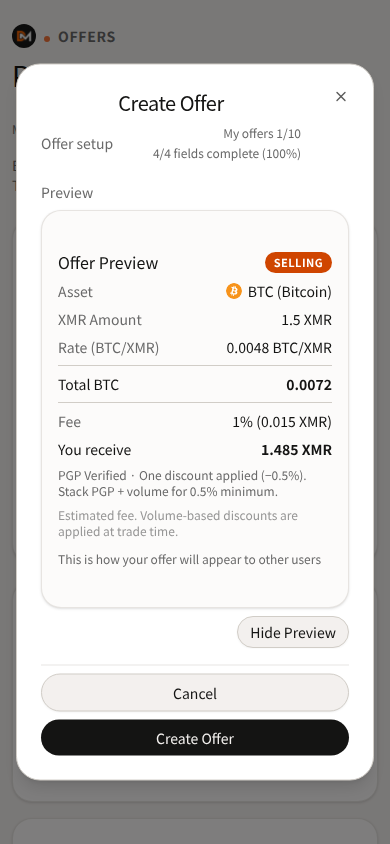
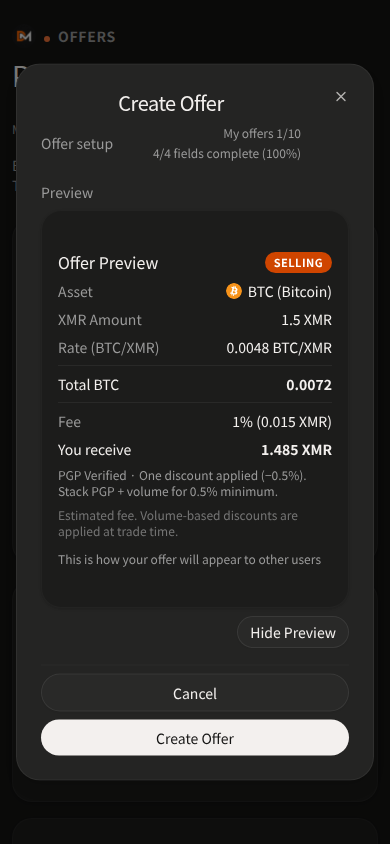
Numbers shown in Create Offer hints
Public hints on that screen:
- 1.5% base
- −0.5% if PGP Verified or High Volume (UI: “reach 10 XMR volume”)
- 0.5% minimum
Tier names: Standard / PGP Verified / High Volume. The English UI does not say whether volume is rolling, 30-day, or lifetime — do not invent a window.
FAQ wording: fees depend on trade size and discount tiers shown in the interface. Review fee disclosures when creating or accepting offers.
Other limits you may hit
These are validation messages, not a limits page:
- “XMR amount must be at least 0.0001”
- “Trade value below minimum ($2 USD equivalent)” (UI default 2; the minimum comes from the live interface)
- “You have reached the maximum open offers …” / “You have reached the maximum active trades …” (counts from the live interface)
- “Rate must stay within ±20% of market …” (asset per 1 XMR; Create Offer shows the allowed min–max)
Network fees are paid on the payment chain or on Monero when you stake — use Automatic fee priority for XMR stake (avoid Slow).
Last updated: 21 September 2026.