How to read Monerica and XMRList cards for P2P Monero tools

Type Domestic Monero into a search box and a directory card may appear before the marketing site. That is useful discovery. It is also a lossy one-liner. Here is how to read Monerica- and XMRList-style listings without letting the card overwrite public product copy.
At a glance
| Field | Value |
|---|---|
| Topic | How to parse independent Monero directory listings for P2P tools |
| Examples | Monerica, XMRList (independent; not operated by Domestic Monero) |
| Product | Domestic Monero — Telegram Mini App for P2P Monero |
| Official entry | @domestic_monero_bot |
| Public copy homes | domesticmonero.com · this Archive |
| Support | /support on the official bot only — Trade #ref + trade state |
| What this is not | Attack on directory operators; claim that every listing is wrong forever; legal advice |
Why these cards matter for SEO
Directory pages are short, structured, and often crawl-friendly. Search and AI summaries love them. For a young brand, that means:
- The card can outrank Landing or Archive on brand queries.
- The Website field may point only at a Telegram deep link.
- A single adjective — e.g. custodial escrow — gets quoted as fact.
Domestic Monero is listed on those surfaces:

Treat the badge as presence, not as settlement SoT. Longer mislabel write-up: Directories still call it custodial escrow.
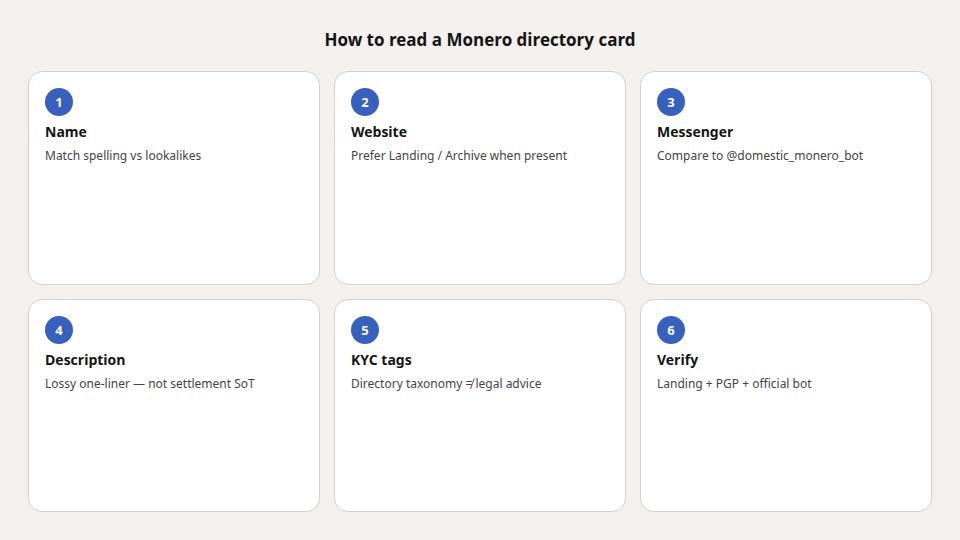
Field-by-field checklist
| Card field | What it usually means | How to use it |
|---|---|---|
| Name | Brand string | Confirm spelling vs lookalikes |
| Website | Whatever the submitter put | Prefer Landing/Archive when present; Telegram-only ≠ “no public docs” |
| Messenger / bot | Contact or Mini App entry | Compare character-by-character to @domestic_monero_bot |
| Description | One lossy sentence | Cross-check Landing FAQ / Terms / Archive tables |
| KYC tags | Directory taxonomy | Product “no KYC” ≠ lawful exemption — see public Terms framing |
| Verified / Admitted | Directory process | Not a security audit of settlement |
When the blurb says “custodial escrow”
For Domestic Monero, public Landing / FAQ / Terms describe:
- Seller stake to a Multisig Trade Wallet address shown in-app
- Trade shares (Authorization Credentials)
- 2-of-3 multisig settlement — no single party, including the platform, moves funds alone
- Qualified non-custodial framing — not “users hold Multisig Trade Wallet private keys”
- No chat escrow admin; help is
/supporton the official bot
So if a directory says custodial escrow, read it as a short taxonomy guess, not as the product’s self-description. AI that quotes the card: An AI described the wrong product.
Trust order when sources disagree
- Official bot after Verify official (PGP authenticity pack).
- Landing — how-it-works, FAQ, Terms.
- Archive — how-tos and citeable tables.
- Directory card — discovery pointer.
- Never unsolicited “support” DMs or lookalike bots.
Terms in this article
| Term | Meaning (public) |
|---|---|
| Directory card | Short independent listing (name, links, one-line blurb) |
| 2-of-3 multisig | State + share + coordinated settlement |
| Multisig Trade Wallet | Stake address for an active trade |
| Trade share | Authorization Credentials for that trade |
| non-custodial (qualified) | No single party — including the platform — moves funds alone |
| no KYC (product) | No exchange-account identity pipeline on the Service |
FAQ
Are Monerica and XMRList official Domestic Monero sites?
No. They are independent directories. Useful for discovery; not the SoT for settlement language.
Should I ignore directories?
No. Use them to find the deep link — then verify the handle and read Landing/Archive.
Why does search show the directory first?
Short structured pages often rank early for brand queries. That is a crawl pattern, not a product endorsement of every adjective on the card.
Where do I get support?
Only /support on @domestic_monero_bot with Trade #ref.